
Handout
A handout is a file you give your client: a completed return, a welcome guide, a letter. Your client sends you nothing: they download the file in their portal, and meo records every download. You add it to a new request, or to a follow-up of a closed request with Follow up.
The settings
Section titled “The settings”Create it in a request, with Add an item then the Handout tile, or save it to the catalogue to reuse it.
- Handout name, required, with if needed a Description (optional) and Instructions (optional) shown with the document.
- File: a PDF of 50 MB at most, or a JPEG, PNG, WebP or HEIC image of 10 MB at most. The file cannot be replaced afterwards.
- Download required: on, your client is reminded until the first download, and the request waits for it to be complete. Off, the document is only handed over, with no reminder.
What your client sees
Section titled “What your client sees”Your client finds the document under Documents for you, with the To download label and the Download button. Once the file is downloaded, the label becomes Downloaded, and Download again remains available.
What you receive
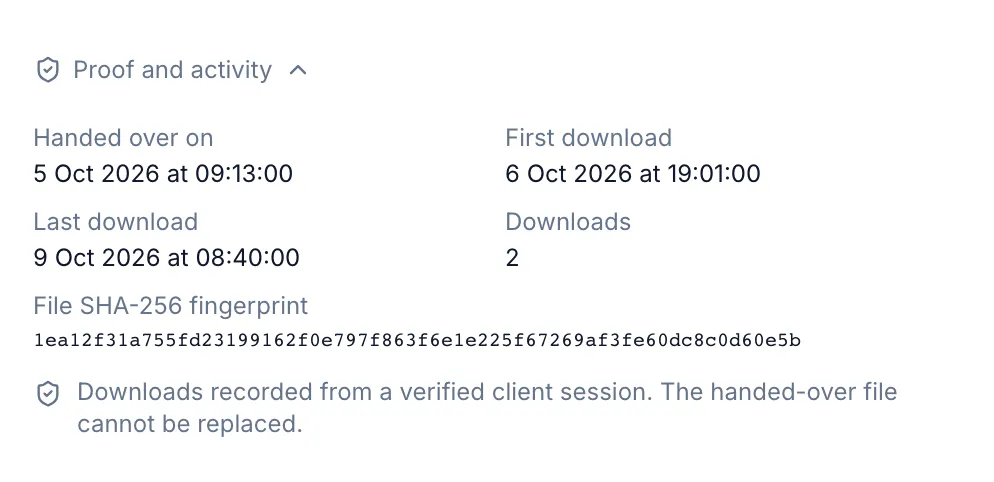
Section titled “What you receive”In the request, the document’s row goes from To download to Downloaded, with the date. Click the row for the proof: Handed over on, First download, Last download, the number of Downloads and the File SHA-256 fingerprint. Downloads are recorded from a verified client session.
Before the first download, the row’s ⋯ menu offers Remove. After it, the menu offers Revoke access.