
Statement
A statement shows your client a text and asks them to respond to it: your terms and conditions, a policy, an acknowledgement of receipt or a yes-or-no decision. There is no PDF and no signature: your client ticks a box or clicks a button, and meo keeps their response as proof. meo’s catalogue offers a few, and you can create your own.
The settings
Section titled “The settings”Create the statement in a request, with Add an item then the Statement tile, or under Settings, Catalogue, Manage elements to reuse it.
- Identification: the Name, which your client sees as the title, a Description (optional) and Instructions shown above the text.
- Text to read: the text, in Content shown to the contact. Line breaks are kept and links that start with http or https become clickable. To point to a web page, fill in External link URL (optional) and External link label (optional).
- Requested response: Confirm reading, a checkbox whose Checkbox label you write; Accept or decline; or Yes or no.
- Retention: how long to keep the response, one year at the start.
The step-by-step guide is Have your client accept terms without signing.
What your client sees
Section titled “What your client sees”Your client reads the name, the instructions and the text, and opens your link if there is one. They tick the box or click a button, then confirm in the Confirm your choice window. Their response goes with the rest of the request, when they submit. Until they have responded, they can also choose I don’t have it.
What you receive
Section titled “What you receive”The statement’s row shows the response and its date, for example “Accepted on” followed by the date. A Decline or No response is a response: the item counts as received.
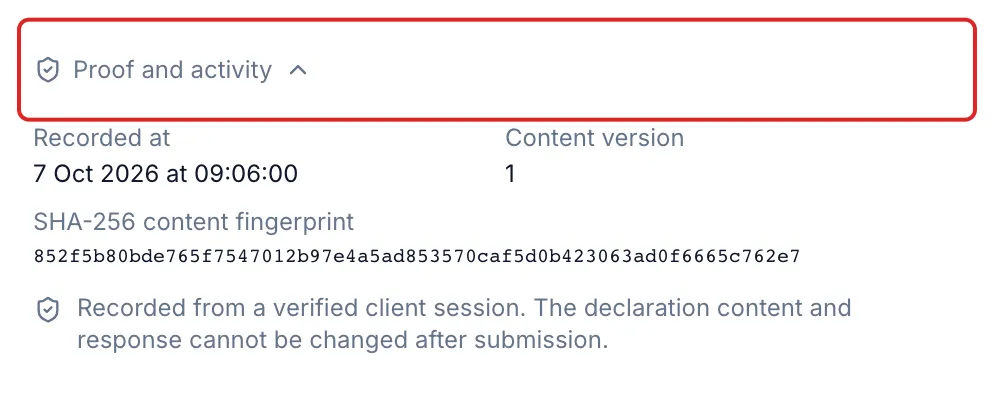
For the proof, click the row, then open Proof and activity: the recording date, the Content version and the SHA-256 content fingerprint. The response is recorded from a verified client session, and neither the text nor the response can be changed after submission.
Statement or signature document?
Section titled “Statement or signature document?”- Choose a statement when your client must read and accept a text, confirm they have read it or answer yes or no.
- Choose a signature document when a PDF must carry a signature, for example a contract or a mandate. meo then seals the document and produces a signature certificate.
A statement is not a signature: no PDF is sealed. See Does a statement accepted by your client hold up as evidence?